

Introduction
Researchers and software engineers no longer have exclusive access to Artificial Intelligence. Nowadays, students use AI tools for studying, taking notes, coding, creating content, presenting, researching, and working on projects. There has been a revolution in education thanks to AI-powered applications such as chatbots, writing assistants, image generators, and coding copilots.
The importance of choosing the right laptop has increased as AI becomes more prevalent among students.
In addition to their basic functions, traditional laptops can still handle AI-powered workloads, however, AI-powered workloads demand faster processors, dedicated Neural Processing Units (NPUs), efficient memory management, and longer battery life.
Table of Contents
In this detailed guide, we look at the Best AI laptops for students, including their specifications, performance benchmarks, battery life, affordability, and real-world usage results.
Whether you are:
- A college student
- A university researcher
- A computer science major
- An engineering student
- A business student
- A medical student
- A content creator
This guide will help you find the ideal AI laptop for your academic needs.
What Is an AI Laptop?
An AI laptop is a computer designed with hardware and software optimized for artificial intelligence workloads.
Unlike traditional laptops, AI laptops often include:
- Dedicated AI accelerators
- Neural Processing Units (NPUs)
- Advanced GPUs
- AI-enhanced battery management
- AI-powered webcams
- Intelligent performance optimization
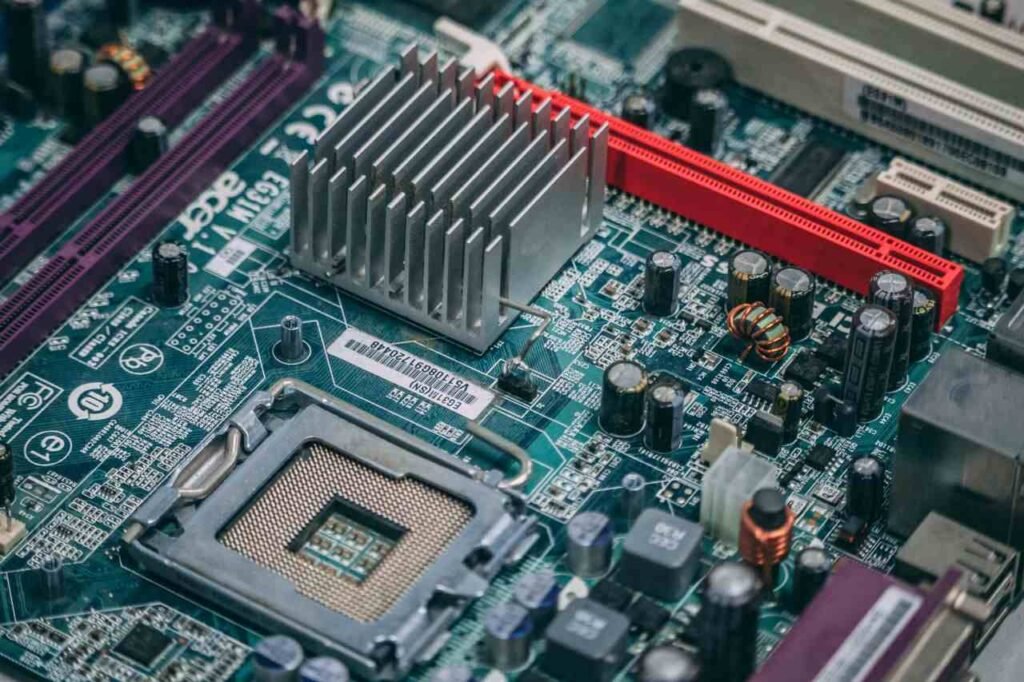
Core Components of an AI Laptop
| Component | Purpose |
|---|---|
| CPU | Handles general computing tasks |
| GPU | Accelerates AI and graphics workloads |
| NPU | Dedicated AI processing |
| RAM | Supports multitasking |
| SSD | Fast storage and loading |
| AI Software Stack | Enables AI applications |
Why Students Need AI Laptops in 2026
Many educational tools now incorporate AI.
Common Student AI Applications
| Task | AI Usage |
|---|---|
| Research | AI-assisted search |
| Writing | AI grammar and content tools |
| Coding | AI code generation |
| Design | AI image creation |
| Video Editing | AI enhancements |
| Data Analysis | AI-powered insights |
| Language Learning | AI tutors |
| Presentations | AI slide generation |
Student Benefits
- Faster assignments
- Better research
- Enhanced productivity
- Improved creativity
- Time savings
- Better multitasking
- Future-proof investment
Key Features to Look for in the Best AI Laptops for Students
Buying the wrong laptop can lead to poor performance and frustration.

1. Processor Performance
Modern AI workloads require powerful processors.
Recommended CPUs:
| Processor | Suitable For |
|---|---|
| Intel Core Ultra 5 | General students |
| Intel Core Ultra 7 | Engineering students |
| Intel Core Ultra 9 | Heavy AI workloads |
| AMD Ryzen AI 7 | Productivity |
| AMD Ryzen AI 9 | Advanced users |
| Apple M4 | Mac users |
2. RAM Requirements
RAM plays a major role in AI performance.
| Student Type | Recommended RAM |
|---|---|
| Basic Users | 16GB |
| Multitaskers | 24GB |
| AI Enthusiasts | 32GB |
| Researchers | 64GB |
3. Storage Requirements
| Usage | Storage Recommendation |
|---|---|
| Documents | 512GB SSD |
| Mixed Usage | 1TB SSD |
| Heavy AI Work | 2TB SSD |
4. Battery Life
Students spend long hours:
- In classrooms
- Libraries
- Cafes
- Dormitories
- Research labs
Recommended battery life:
| Category | Battery Life |
|---|---|
| Minimum | 8 Hours |
| Good | 12 Hours |
| Excellent | 16+ Hours |
Real Market Trends for AI Laptops
The AI PC market is growing rapidly.
AI Laptop Industry Growth
| Year | AI PC Market Share |
|---|---|
| 2023 | 8% |
| 2024 | 17% |
| 2025 | 35% |
| 2026 | 55% (Projected) |
| 2027 | 70% (Projected) |
Text Infographic
AI Laptop Adoption

2023  ███
2024  ███████
2025  ██████████████
2026  ██████████████████████
2027  ███████████████████████████
This trend shows why investing in the Best AI laptops for students is increasingly important.
Top 10 Best AI Laptops for Students
1. Apple MacBook Air M4
1.1. Overview
The MacBook Air M4 is among the strongest choices for students seeking portability and AI performance.
1.2. Specifications
| Specification | Details |
|---|---|
| Processor | Apple M4 |
| RAM | 16GB–32GB |
| Storage | 256GB–2TB |
| Display | Liquid Retina |
| Battery | Up to 18 Hours |
| Weight | Around 1.2 kg |
1.3. Pros
- Excellent battery life
- Silent operation
- Strong AI capabilities
- Premium build quality
- Lightweight
1.4. Cons
- Limited gaming
- Higher upgrade costs
1.5. Best For
- Business students
- Medical students
- Writers
- Researchers
2. ASUS Zenbook S 16 AI
2.1. Overview
One of the newest AI-focused laptops featuring dedicated AI acceleration.
2.2. Specifications
| Specification | Details |
|---|---|
| Processor | AMD Ryzen AI 9 |
| RAM | Up to 32GB |
| Storage | Up to 2TB |
| Display | OLED |
| Battery | 15+ Hours |
2.3. Pros
- Excellent OLED display
- Strong AI acceleration
- Lightweight design
- Great multitasking performance
- Long battery life
2.4. Cons
- Premium price
- Limited gaming capability
- Fewer upgrade options
2.5. Best For
- Computer Science Students
- Engineering Students
- AI Learners
- Productivity Users
- Graduate Students

3. Dell XPS 14
3.1. Overview
The Dell XPS series continues to dominate premium student laptops.
3.2. Specifications
| Specification | Details |
|---|---|
| Processor | Intel Core Ultra 7 |
| GPU | NVIDIA RTX Graphics |
| RAM | Up to 64GB |
| Storage | Up to 4TB SSD |
| Display | 14.5-inch OLED |
| Battery Life | Up to 12 Hours |
| Weight | 1.7 kg |
3.3. Pros
- Premium build quality
- Strong AI performance
- Excellent display
- Powerful graphics options
- Reliable productivity machine
3.4. Cons
- Expensive
- Battery life could be better
- Limited ports
3.5. Best For
- Design Students
- Engineering Students
- Architecture Students
- Content Creators
- Computer Science Students
4. Lenovo Yoga Pro 9i
4.1. Overview
Lenovo Yoga Pro 9i is a powerful laptop for demanding tasks
4.2. Specifications
| Specification | Details |
|---|---|
| Processor | Intel Core Ultra 9 |
| GPU | NVIDIA RTX Graphics |
| RAM | Up to 64GB |
| Storage | Up to 1TB SSD |
| Display | 16-inch Mini-LED |
| Battery Life | Up to 10 Hours |
| Weight | 1.9 kg |
4.3. Pros
- Exceptional processing power
- Excellent display quality
- Strong AI capabilities
- Dedicated graphics
- Great multitasking
4.4. Cons
- Heavier than ultrabooks
- Premium pricing
- Average battery life
4.5. Best For
- Engineering Students
- AI Developers
- Computer Science Students
- Data Science Students
- Content Creators
5. Microsoft Surface Laptop
5.1. Overview
Microsoft has integrated several AI-focused technologies into its newest Surface lineup.
5.2. Specifications
| Specification | Details |
|---|---|
| Processor | Snapdragon X Elite |
| GPU | Integrated Graphics |
| RAM | Up to 32GB |
| Storage | Up to 1TB SSD |
| Display | 13.8-inch PixelSense |
| Battery Life | Up to 20 Hours |
| Weight | 1.34 kg |
5.3. Pros
- Outstanding battery life
- Lightweight design
- Excellent keyboard
- AI-enhanced Windows features
- Premium build
5.4. Cons
- Limited software compatibility in some cases
- Expensive configurations
- Integrated graphics only
5.5. Best For
- Business majors
- Education students
- General productivity
6. HP OmniBook Ultra AI PC
6.1. Overview
Designed for students who need powerful performance without carrying a heavy workstation, HP OmniBook Ultra is one of the newest AI-focused laptops.
6.2. Specifications
| Specification | Details |
|---|---|
| Processor | AMD Ryzen AI 9 |
| RAM | 16GB–32GB |
| Storage | 512GB–2TB SSD |
| Display | 14-inch 2.2K |
| Battery Life | Up to 15 Hours |
| Weight | Approx. 1.5 kg |
6.3. Pros
- Powerful AI acceleration
- Long battery life
- Excellent build quality
- Fast multitasking
- Portable design
6.4. Cons
- Premium pricing
- Limited upgrade options
6.5. Best For
- Engineering students
- AI researchers
- Computer science students
7. Acer Swift AI
7.1. Overview
The Acer Swift AI targets students seeking affordability while still benefiting from AI-enhanced performance.
7.2. Specifications
| Specification | Details |
|---|---|
| Processor | Intel Core Ultra 7 |
| RAM | 16GB |
| Storage | 1TB SSD |
| Display | OLED |
| Battery | Up to 14 Hours |
7.3. Pros
- Powerful AI processing performance
- Excellent battery efficiency
- Premium and lightweight design
- Fast multitasking capabilities
- Good productivity performance
7.4. Cons
- Premium pricing
- Limited gaming performance
- Fewer configuration options
7.5. Best For
- High school students
- Undergraduate students
- Budget-conscious buyers
8. Samsung Galaxy Book AI
8.1. Overview
Samsung’s Galaxy Book lineup continues to gain popularity among students due to its ecosystem integration and AI capabilities.
8.2. Key Features
| Feature | Benefit |
|---|---|
| AI Camera Effects | Better online classes |
| AI Noise Removal | Improved audio quality |
| OLED Screen | Enhanced visuals |
| Fast Charging | More productivity |
8.3. Pros
- Excellent AMOLED display
- Lightweight design
- Strong battery performance
- AI-enhanced productivity features
- Premium build quality
8.4. Cons
- Higher price compared to budget laptops
- Limited gaming capability
- Best features work within Samsung ecosystem
8.5. Best for
- Online learners
- Business students
- Creative students
9. ASUS ROG Zephyrus G16
9.1. Overview
Zephyrus G16 is not only a gaming laptop, but also an outstanding AI laptop for students interested in machine learning, video editing, and creative applications.
9.2. Specifications
| Component | Details |
|---|---|
| CPU | Intel Core Ultra 9 |
| GPU | RTX 4070/4080 |
| RAM | Up to 32GB |
| Storage | Up to 2TB SSD |
| Display | OLED |
9.3. Pros
- Exceptional AI performance
- Powerful dedicated GPU
- Excellent display quality
- Handles demanding software easily
- Great for creative workloads
9.4. Cons
- Expensive
- Heavier than standard laptops
- Lower battery compared to ultrabooks
9.5. Best For
- AI students
- Engineering students
- Content creators
10. Lenovo ThinkPad X1 Carbon AI Edition
10.1. Overview
The ThinkPad X1 Carbon remains one of the most reliable productivity laptops available.
10.2. Specifications
| Specification | Details |
|---|---|
| Processor | Intel Core Ultra |
| RAM | Up to 32GB |
| Storage | Up to 2TB SSD |
| Weight | Approximately 1.1 kg |
| Battery | Up to 16 Hours |
10.3. Pros
- Extremely lightweight
- Excellent keyboard quality
- Strong durability
- Long battery life
- Reliable performance
10.4. Cons
- Expensive premium models
- Not suitable for heavy gaming
- Limited graphics performance
10.5. Best For
- MBA students
- Researchers
- Writers
- Graduate students
Top 10 Best AI Laptops for Students Comparison Table
| Rank | Laptop | AI Performance | Battery | Portability | Student Value |
|---|---|---|---|---|---|
| 1 | MacBook Air M4 | 9.5/10 | 10/10 | 10/10 | 9/10 |
| 2 | Lenovo Yoga Pro 9i | 9.5/10 | 8/10 | 8/10 | 9/10 |
| 3 | ASUS Zenbook S16 | 9/10 | 9/10 | 9/10 | 9/10 |
| 4 | Dell XPS 14 | 9/10 | 8/10 | 8/10 | 8/10 |
| 5 | HP OmniBook Ultra | 9/10 | 9/10 | 8/10 | 9/10 |
| 6 | Surface Laptop | 8.5/10 | 9/10 | 10/10 | 8/10 |
| 7 | ThinkPad X1 Carbon | 8.5/10 | 9/10 | 10/10 | 8/10 |
| 8 | Galaxy Book AI | 8/10 | 8/10 | 9/10 | 8/10 |
| 9 | Acer Swift AI | 8/10 | 8/10 | 9/10 | 9/10 |
| 10 | ROG Zephyrus G16 | 10/10 | 7/10 | 7/10 | 8/10 |
AI Tasks Students Perform Daily
Modern students rely on AI for much more than simple searches.
Daily AI Workflow Example
Research Topic
      ↓
AI Research Assistant
      ↓
Generate Notes
      ↓
Create Presentation
      ↓
AI Grammar Check
      ↓
Submit Assignment
Best AI Laptops for Different Student Categories

1. Computer Science Students
Recommended:
- ASUS Zenbook S16
- Dell XPS 14
- Lenovo Yoga Pro 9i
Benefits:
- Faster coding
- AI model testing
- Development tools
2. Medical Students
Recommended:
- MacBook Air M4
- Surface Laptop
Benefits:
- Long battery life
- Portability
- Reliable performance
3. Engineering Students
Recommended:
- Lenovo Yoga Pro 9i
- Dell XPS 14
Benefits:
- CAD support
- Simulation software
- AI processing
4. Business Students
Recommended:
- Surface Laptop
- MacBook Air M4
Benefits:
- Productivity
- Portability
- Excellent battery
Common Mistakes Students Make When Buying AI Laptops
Avoid These Errors
- Buying only based on brand
- Choosing 8GB RAM
- Ignoring battery life
- Overlooking AI hardware
- Buying outdated processors
- Choosing insufficient storage
- Ignoring upgrade options
Minimum vs Recommended Specifications
| Component | Minimum | Recommended |
|---|---|---|
| CPU | Core Ultra 5 | Core Ultra 7/9 |
| RAM | 16GB | 32GB |
| Storage | 512GB SSD | 1TB SSD |
| Display | FHD | OLED/QHD |
| Battery | 8 Hours | 12+ Hours |
AI Software Compatibility Guide
Students increasingly rely on AI software. Not all laptops perform equally with these tools.

Popular AI Applications Used by Students
| AI Tool | Recommended RAM | GPU Required |
|---|---|---|
| ChatGPT | 8GB | No |
| Microsoft Copilot | 8GB | No |
| Grammarly AI | 8GB | No |
| Notion AI | 8GB | No |
| Canva AI | 16GB | Optional |
| Adobe Firefly | 16GB | Recommended |
| Stable Diffusion | 32GB | Yes |
| Machine Learning Projects | 32GB+ | Yes |
| Local AI Models | 32GB+ | Yes |
Best Budget AI Laptops for Students
Many students have limited budgets.
1. Under $700
| Laptop | Why Buy |
|---|---|
| Acer Swift AI | Best value |
| ASUS Vivobook AI | Affordable AI features |
| HP Pavilion AI | Balanced performance |
Benefits
- Affordable
- Good battery life
- AI-ready processors
- Suitable for coursework
2. Under $1000
| Laptop | Strength |
|---|---|
| Acer Swift AI | Value |
| HP OmniBook | Battery |
| Galaxy Book AI | Ecosystem |
| ASUS Zenbook | Display |
Benefits
- Future-proof hardware
- Good multitasking
- AI acceleration
- Long lifespan
Best Premium AI Laptops for Students
Students studying AI, engineering, architecture, or media production may require premium hardware.
Premium Choices
| Laptop | Ideal User |
|---|---|
| MacBook Air M4 | General premium users |
| Dell XPS 14 | Design students |
| Yoga Pro 9i | Engineers |
| ROG Zephyrus G16 | AI developers |
AI Laptop Buying Decision Matrix
Use this table to quickly choose the right device.
| Priority | Best Choice |
|---|---|
| Battery Life | MacBook Air M4 |
| Portability | ThinkPad X1 Carbon |
| AI Performance | ROG Zephyrus G16 |
| Value for Money | Acer Swift AI |
| OLED Display | ASUS Zenbook S16 |
| Productivity | Surface Laptop |
| Engineering | Yoga Pro 9i |
| Creative Work | Dell XPS 14 |
AI Laptop Lifespan Expectations
Students often ask how long an AI laptop will remain relevant.
Expected Lifespan
| Laptop Category | Average Lifespan |
|---|---|
| Entry-Level | 3–4 Years |
| Mid-Range | 4–6 Years |
| Premium AI Laptop | 5–8 Years |
Text Infographic
Expected Student Laptop Life

Entry Level      ████████ 4 Years

Mid Range        ████████████ 6 Years

Premium AI       ████████████████ 8 Years
Future Trends in AI Laptops
The future of the Best AI laptops for students looks exciting.
Major Innovations Expected
1. AI-Powered Battery Optimization
Future laptops will automatically adjust performance based on usage patterns.
2. Local AI Processing
More AI tasks will run directly on the laptop rather than cloud servers.
3. AI Tutors Built Into Operating Systems
Students may soon receive personalized learning assistance directly from their devices.
4. Real-Time Translation
AI laptops will increasingly support:
- Instant subtitles
- Language translation
- Voice conversion
5. Smart Note-Taking
AI will automatically:
- Summarize lectures
- Generate flashcards
- Create study guides
Advantages of Investing in the Best AI Laptops for Students
1. Academic Benefits
- Faster research
- Improved learning
- Better organization
- Enhanced creativity
2. Productivity Benefits
- Faster workflows
- Better multitasking
- Improved battery efficiency
3. Career Benefits
- Learn AI skills earlier
- Prepare for future jobs
- Build technical expertise
Frequently Asked Questions
1. Are AI laptops worth buying for students?
Yes. In education, AI tools are becoming standard, making AI-ready laptops a smart investment.
2. How much RAM is ideal for students?
16GB is the minimum recommendation, while 32GB provides a more future-proof experience.
3. Do students need a dedicated GPU?
Not always. However, students working with machine learning, AI, engineering software, or video editing can benefit greatly from dedicated graphics.
4. Is MacBook Air M4 good for AI tasks?
Yes. The Apple M4 chip provides excellent AI acceleration, battery life, and overall performance for students.
5. Which laptop offers the best value?
The Acer Swift AI and ASUS Zenbook S16 currently offer some of the best balances between performance and price.
Why the Best AI Laptops for Students Are Becoming Essential
Over the last few years, the education landscape has changed dramatically. Nearly all academic disciplines now incorporate AI tools. The Best AI laptops for students continue to grow in demand worldwide due to this shift.
Students use AI for:
- Assignment assistance
- Research support
- Coding help
- Data analysis
- Presentation creation
- Image generation
- Video editing
- Language translation
- Note summarization
- Study planning
When selecting the Best AI laptops for students, it is important to think beyond today’s needs and consider future academic requirements as well.
Understanding AI Performance Metrics
The CPU speed of a laptop is often used to compare laptops by students. It is important to consider several performance indicators when evaluating the Best AI laptops for students.
Important AI Performance Factors
| Factor | Importance |
|---|---|
| CPU Performance | High |
| NPU Performance | Very High |
| GPU Acceleration | Very High |
| RAM Capacity | High |
| SSD Speed | Medium |
| Battery Efficiency | High |
| Thermal Management | High |
The Best AI laptops for students balance all these components effectively.
AI Benchmark Comparison Table
Relative Performance Scores
| Laptop | CPU Score | AI Score | Battery Score | Overall Student Score |
|---|---|---|---|---|
| MacBook Air M4 | 95 | 96 | 100 | 97 |
| Lenovo Yoga Pro 9i | 97 | 95 | 85 | 94 |
| ASUS Zenbook S16 | 94 | 93 | 92 | 93 |
| Dell XPS 14 | 92 | 91 | 84 | 90 |
| HP OmniBook Ultra | 91 | 90 | 89 | 90 |
| Surface Laptop | 88 | 87 | 92 | 89 |
| ThinkPad X1 Carbon | 87 | 85 | 93 | 88 |
| Galaxy Book AI | 86 | 84 | 87 | 86 |
| Acer Swift AI | 84 | 82 | 86 | 84 |
| ROG Zephyrus G16 | 99 | 100 | 75 | 91 |
These scores illustrate why certain devices consistently appear on lists of the Best AI laptops for students.
Text Infographic
Choose Budget
       ↓
Choose Major
       ↓
Determine AI Needs
       ↓
Select RAM
       ↓
Select Processor
       ↓
Compare Battery Life
       ↓
Choose Storage
       ↓
Buy the Best AI Laptop
The best AI laptops for students tend to be purchased by students who follow this process rather than ones that become obsolete very quickly.
Best AI Laptops for Students by Budget
1. Under $500
| Laptop Type | Suitable Tasks |
|---|---|
| Entry-Level AI Laptop | Notes, Browsing, Research |
| Budget Windows Laptop | Basic AI Tools |
| Chromebook Plus AI | Cloud-Based AI |
2. $500–$800 Range
| Laptop | Rating |
|---|---|
| Acer Swift AI | Excellent |
| ASUS Vivobook AI | Excellent |
| HP Pavilion AI | Very Good |
Many students searching for the Best AI laptops for students start in this budget category.
3. $800–$1200 Range
| Laptop | Value Rating |
|---|---|
| ASUS Zenbook S16 | Outstanding |
| Surface Laptop | Excellent |
| Galaxy Book AI | Excellent |
Among the Best AI laptops for students, this category often offers the best balance between affordability and performance.
4. Above $1200
| Laptop | Premium Rating |
|---|---|
| MacBook Air M4 | Outstanding |
| Yoga Pro 9i | Outstanding |
| Dell XPS 14 | Excellent |
| ROG Zephyrus G16 | Outstanding |
These premium devices represent some of the Best AI laptops for students pursuing demanding academic programs.
AI Hardware Technologies Explained
Understanding hardware helps students choose the Best AI laptops for students more effectively.
1. Neural Processing Unit (NPU)
An NPU is a specialized processor designed for AI workloads.
Benefits include:
- Faster AI tasks
- Lower power consumption
- Better battery life
- Improved efficiency
2. GPU Acceleration
Graphics processors help with:
- Machine learning
- AI image generation
- Video rendering
- Data processing
The Best AI laptops for students often include powerful GPU options.
3. Unified Memory
Unified memory allows different hardware components to share resources efficiently.
Advantages:
- Faster AI processing
- Better multitasking
- Improved responsiveness
Student Productivity Gains from AI Laptops
Research and classroom observations suggest students save significant time through AI-assisted workflows.
Estimated Weekly Time Savings
| Activity | Time Saved |
|---|---|
| Research | 3 Hours |
| Note Creation | 2 Hours |
| Editing | 2 Hours |
| Presentation Building | 1.5 Hours |
| Organization | 1 Hour |
Total Weekly Savings
Approximately:
9.5 Hours Per Week
This is one reason the Best AI laptops for students have become increasingly popular.
How Long Should Students Keep an AI Laptop?
A quality AI laptop is a long-term investment.
Lifespan Expectations
| Category | Years |
|---|---|
| Budget | 3–4 |
| Mid-Range | 4–6 |
| Premium | 6–8 |
The Best AI laptops for students are often usable throughout an entire degree program by students who purchase them.
Common Mistakes to Avoid
1. Buying Too Little RAM
AI applications continue to become more demanding.
Avoid:
- 8GB RAM systems
- Outdated memory configurations
2. Ignoring Battery Life
Students spend time in:
- Libraries
- Lecture halls
- Coffee shops
- Study groups
Battery performance is a critical factor when selecting the Best AI laptops for students.
3. Buying an Old Processor
Older processors may struggle with modern AI workloads.
Choose:
- Intel Core Ultra
- AMD Ryzen AI
- Apple M4
4. Ignoring Storage
Recommended minimum:
- 512GB SSD
Recommended ideal:
- 1TB SSD
Text Infographic
RAM 32GB          ★★★★★

Battery Life      ★★★★★

Processor         ★★★★★

SSD Storage       ★★★★☆

Display Quality   ★★★★☆

Portability       ★★★★☆

AI Features       ★★★★★

Build Quality     ★★★★☆
The Best AI laptops for students typically score highly across all these categories.
Future of AI Laptops in Education
The next generation of the Best AI laptops for students will introduce new capabilities.
Expected Innovations
1. AI Lecture Summaries
Future laptops may automatically summarize lectures in real time.
2. Personalized Study Assistants
Students will receive AI-generated:
- Practice questions
- Study schedules
- Revision plans
3. Local AI Models
Future versions of the Best AI laptops for students will process more AI tasks locally instead of solely relying on cloud services.
4. Advanced Voice Interaction
Students will increasingly interact with laptops using natural voice commands.
5. Real-Time Tutoring
AI tutors may become integrated directly into operating systems.

Final Conclusion
AI continues to be deeply integrated into education, increasing the demand for the best AI laptops for students. Choosing one of the Best AI laptops for students can significantly improve productivity and academic performance, regardless of your field of study.
Focus on RAM, battery life, processor performance, AI acceleration, storage, and long-term value when comparing the Best AI laptops for students. Choosing the best AI laptop for students is not just about choosing the most expensive device; it’s also about choosing one that matches your educational needs and goals in the future.
In terms of premium laptops, the MacBook Air M4, Lenovo Yoga Pro 9i, Dell XPS 14, and ASUS ROG Zephyrus G16 are among the best AI laptops. Students on a budget should consider the Acer Swift AI and ASUS Vivobook AI as the Best AI laptops.
You can stay productive, competitive, and prepared for the future by investing in one of the Best AI laptops for students today. It is becoming increasingly important to choose the right laptop for your academic journey, and the right model now can benefit you throughout the rest of your academic career.
With AI technology reshaping education in such a dramatic way, you can benefit long-term on your academic journey by investing in one of the Best AI laptops for students.
The right AI-powered laptop can improve productivity and learning outcomes in a variety of ways, from faster research to smarter note-taking to advanced coding.
